September 18, 2026
5 Key Advantages of a Sturdy Gaming Desk Mount Over a Free-Standing Setup
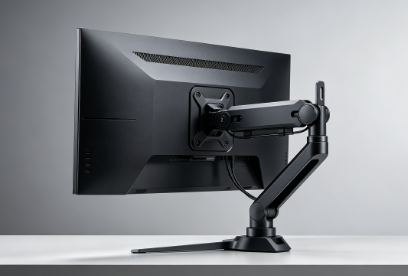
Table of Contents
Introduction
Advantage 1 – Superior Stability and Vibration Damping
Advantage 2 – Maximum Desk Space Recovery
Advantage 3 – Full Ergonomic Adjustability
Advantage 4 – Dynamic Flexibility for Any Game
Advantage 5 – Clean Aesthetics and Cable Management
Market Context – The Growing Demand for Monitor Arms
Conclusion
Frequently Asked Questions (FAQ)
1. Introduction
The monitor is the centerpiece of any gaming setup. It‘s where the action happens. But the stand it sits on often gets overlooked. A bulky free-standing base might hold the screen, but it also eats up desk space, locks you into one viewing angle, and can transmit vibration from every keystroke.
The gaming desk mount—specifically, a sturdy, articulating monitor arm—changes everything. It lifts the screen off the desk, frees up the entire surface, and gives you the freedom to position your monitor exactly where you need it. And with the global monitor arms market valued at USD 2.11 billion in 2025 and projected to grow at a CAGR of 6.39% to reach USD 3.26 billion by 2032, it‘s clear that gamers and professionals alike are making the switch.
This guide breaks down the five key advantages of a sturdy gaming desk mount over a free-standing setup.
2. Advantage 1 – Superior Stability and Vibration Damping
A free-standing monitor stand places the monitor‘s weight directly on the desktop. When you type, click, or bump the desk, that movement transfers to the screen. The wobble is distracting. In competitive gaming, even a fraction of a second of visual instability can cost you the round.
A sturdy desk mount clamps directly to the desk, creating a rigid connection that minimizes vibration. The robust construction of a quality mount keeps your monitor stable, reducing the risk of sagging or tilting over time. Gas spring-powered arms hold your monitor firmly in place at the right height, preventing it from sagging over time. For heavy ultrawide or curved monitors—which can weigh up to 44 lbs (20 kg) or more—this stability is non-negotiable.
Feature | Free-Standing Stand | Sturdy Desk Mount |
Stability | Variable; susceptible to vibration and wobble | Rigid clamp connection; minimal vibration transfer |
Weight Support | Often limited; sagging common with heavy screens | Supports up to 44 lbs+ for ultrawide/curved monitors |
Sag Prevention | Prone to tilting over time | Gas spring tension holds position firmly |
3. Advantage 2 – Maximum Desk Space Recovery
The most immediate benefit of a desk mount is the desk space it frees up. Free-standing stands, especially those designed for large gaming monitors, often have wide, deep bases that consume a significant portion of your desk. A monitor arm, by contrast, clamps to the back or side of your desk and lifts the display into the air, effectively erasing the footprint of that bulky stand.
This is a game-changer for smaller desks. By reclaiming approximately 90% of the stand‘s footprint, you can fit a full gaming setup—keyboard, mouse, mousepad, and even a second monitor—in a compact space. Your desk is no longer a monitor stand with some room for peripherals; it‘s a proper gaming station.
4. Advantage 3 – Full Ergonomic Adjustability
Free-standing stands typically offer limited adjustability. You might get basic height adjustment or tilt, but your options are often restricted. A sturdy gaming desk mount provides a full range of motion: raise, lower, pull the screen closer, push it back, tilt it, rotate it into portrait mode, and swivel it left or right.
This level of adjustability allows you to position your monitor at the perfect height and distance for your specific setup. Proper ergonomic positioning reduces neck and eye strain, promotes better posture, and supports longer, more comfortable gaming sessions. With a monitor arm, you adjust the screen to fit you, not the other way around. The ROG Ergo Monitor Arm, for example, features an upgraded tilt head with an adjustable tension screw to ensure your ultra-wide display stays perfectly positioned.
5. Advantage 4 – Dynamic Flexibility for Any Game
A free-standing stand is static. It‘s set it and forget it. That‘s fine for some, but a desk mount transforms your monitor into a dynamic element of your setup.
With a full-motion arm, you can effortlessly pull the screen closer for competitive shooters where every pixel counts, or push it back when you want to lean back and watch a video. This flexibility is invaluable for gamers who switch between different game genres or use their setup for both work and play. The full motion design enables you to lower and raise, swivel, tilt, and rotate your screen to achieve the perfect viewing height and angle for any situation.
6. Advantage 5 – Clean Aesthetics and Cable Management
Beyond functionality, a desk mount elevates the overall look of your gaming station. By removing a bulky stand from the desk surface, you create a cleaner, more minimalist, and professional-looking setup. Your monitor appears to float above the desk, giving your station a modern and uncluttered aesthetic.
Most monitor arms come with built-in cable channels. You can route your display, power, and peripheral cables neatly along the arm, keeping them hidden and organized. This transforms your desk from a spaghetti junction into a sleek, functional command center. The Red Dot Design Award-winning Ares Monitor Arm, for instance, features a well-thought-out cable management system that allows for a tidy, ordered desk setup.
7. Market Context – The Growing Demand for Monitor Arms
The shift toward monitor arms is not just a trend—it‘s a market movement. The global monitor arms market was valued at USD 2.11 billion in 2025 and is projected to grow to USD 3.26 billion by 2032, at a CAGR of 6.39%. This growth is driven by the increasing popularity of ultrawide and curved monitors, the rise of multi-monitor setups for gaming and productivity, and a growing awareness of ergonomic health.
Metric | Value |
Global Monitor Arms Market (2025) | USD 2.11 billion |
Projected Market (2032) | USD 3.26 billion |
CAGR (2025–2032) | 6.39% |
Monitor Arm Weight Capacity (High-End) | Up to 44 lbs (20 kg) |
Desk Space Recovered | ~90% of stand footprint |
8. Conclusion
A sturdy gaming desk mount offers clear advantages over a free-standing stand. It provides superior stability, eliminates the wobble and sag that plague heavy monitors. It frees up your desk space, giving you room for the peripherals that matter. It delivers full ergonomic adjustability, reducing strain and improving comfort. It offers dynamic flexibility, letting you adapt your setup to any game. And it creates a clean, professional aesthetic with integrated cable management.
For any gamer looking to upgrade their setup, a desk mount is not just an accessory—it‘s an essential upgrade.
9. Frequently Asked Questions (FAQ)
Q: Is a desk mount more stable than a free-standing monitor stand?
A: Generally, yes. A desk mount clamps securely to the desk, providing a more rigid connection that reduces wobble from typing or vibrations. A free-standing stand, while often stable on its own, can transmit more movement from the desk to the monitor.
Q: Will a desk mount save space on my desk?
A: Absolutely. By suspending the monitor, a desk mount frees up the entire footprint that the original stand used, freeing up space for other peripherals. This is a major advantage, especially for smaller desks.
Q: Are desk mounts easy to install?
A: It depends on the mount. Most clamp mounts are relatively straightforward to install, requiring only a few minutes and a screwdriver. However, some more complex arms might require more effort, especially when attaching heavy monitors.
Q: Can a desk mount hold a heavy ultrawide monitor?
A: Yes, but you must check the mount‘s weight capacity. A budget or lightweight arm might not be able to support a heavy, curved, or ultrawide screen. It‘s crucial to choose a sturdy, heavy-duty mount with a high enough weight rating for your specific monitor.
Q: Are there different types of desk mounts?
A: Yes. The two main types are monitor arms, which offer a full range of motion, and monitor stands, which have a more basic base and pedestal design. For gamers, an articulating arm is generally preferred for its superior flexibility.